lms-esp32-pybricks-info
Comparison of different color sensors
Sensors used with the LMS-ESP32 board from Antons Mindstorms and LEGO® Spike running Pybricks.
Devices
| Name: | Quality: | Lag: | Measurement Time: |
|---|---|---|---|
| Lego 45605 | ++ | 0 | 9-10 msec |
| TCS34725 | + | 15 msec | 2.4 msec steps |
| APDS9960 | (+) | 10 msec | 2.78 msec steps |
| GY-33 | - | 75 msec | 2.4, 24, 100 msec |
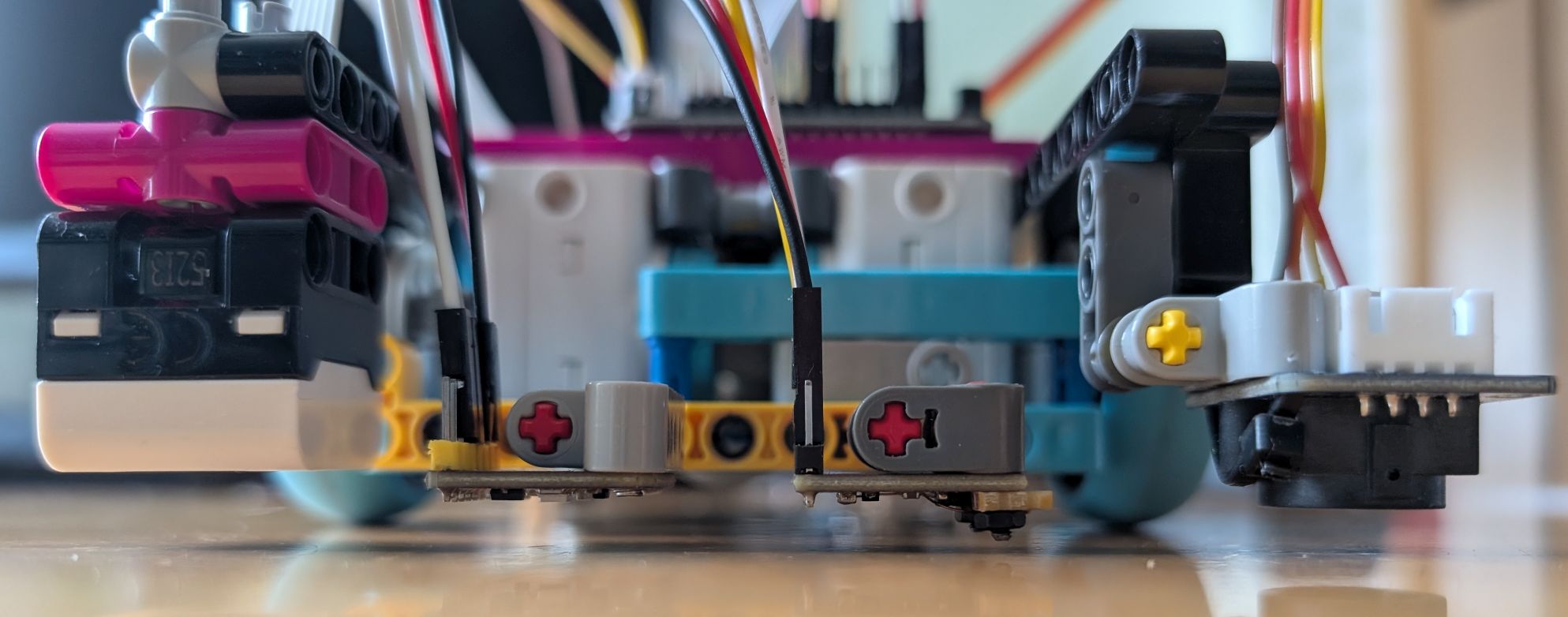
Lag comparison
All sensors were placed one beam above the ground and adjusted to the same position at very low speed when driving across a black line:
 Then the lag to the Lego sensor was measured at 200 mm/sec:

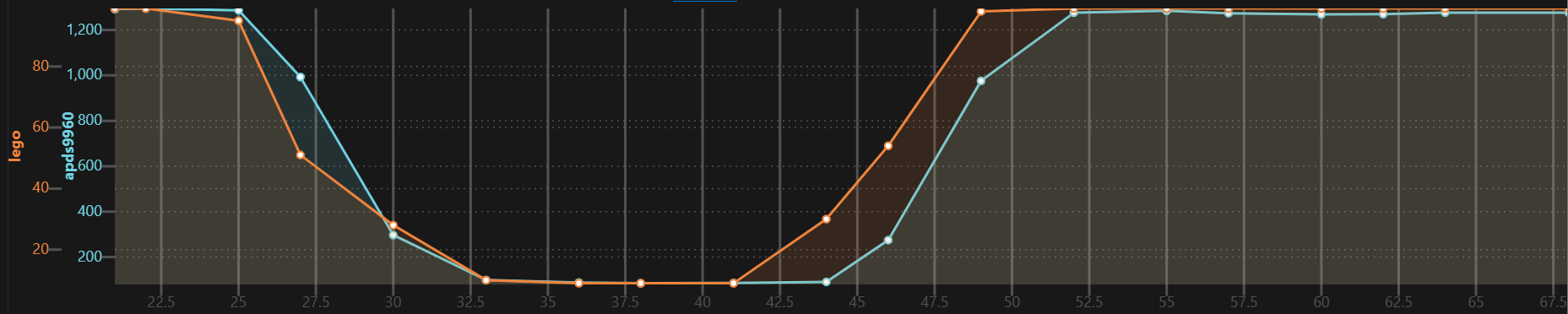
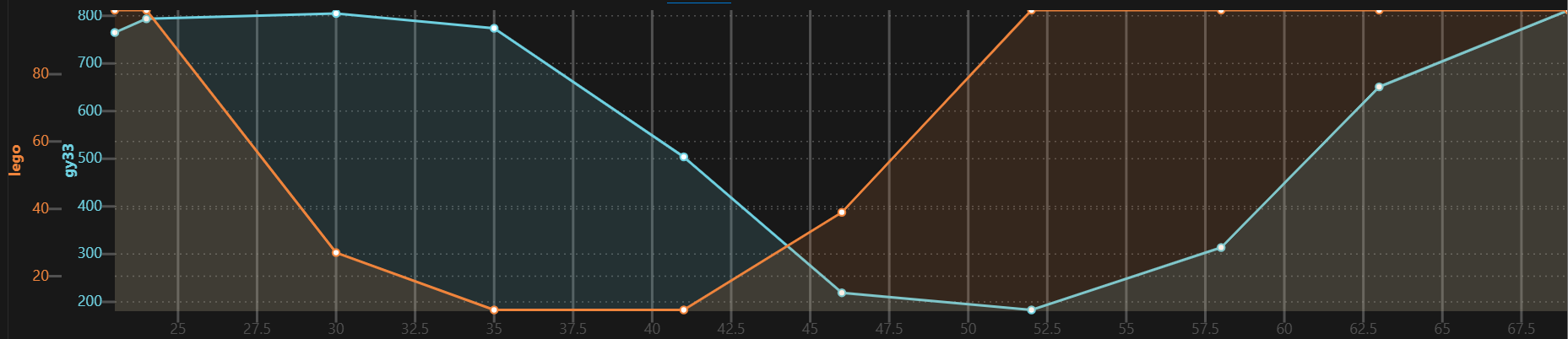
Data comparison
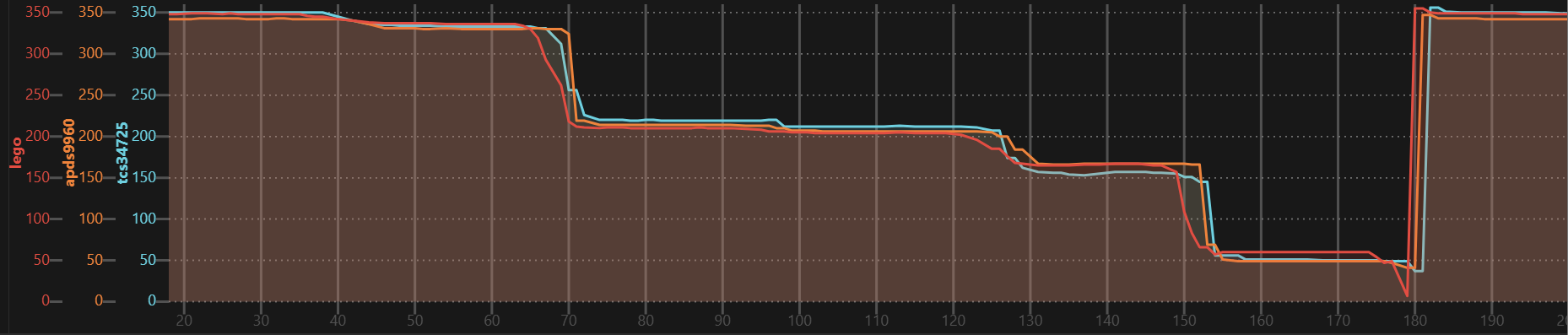
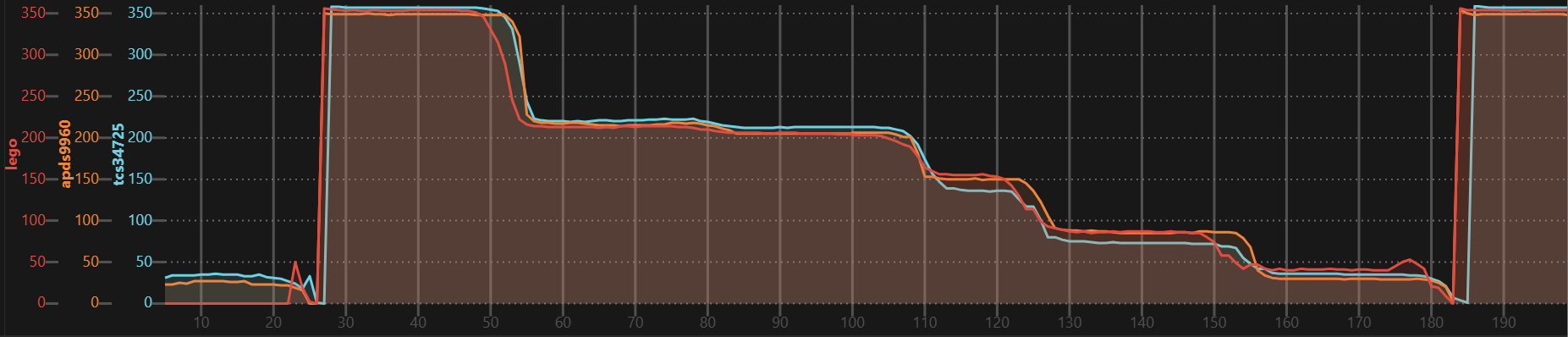
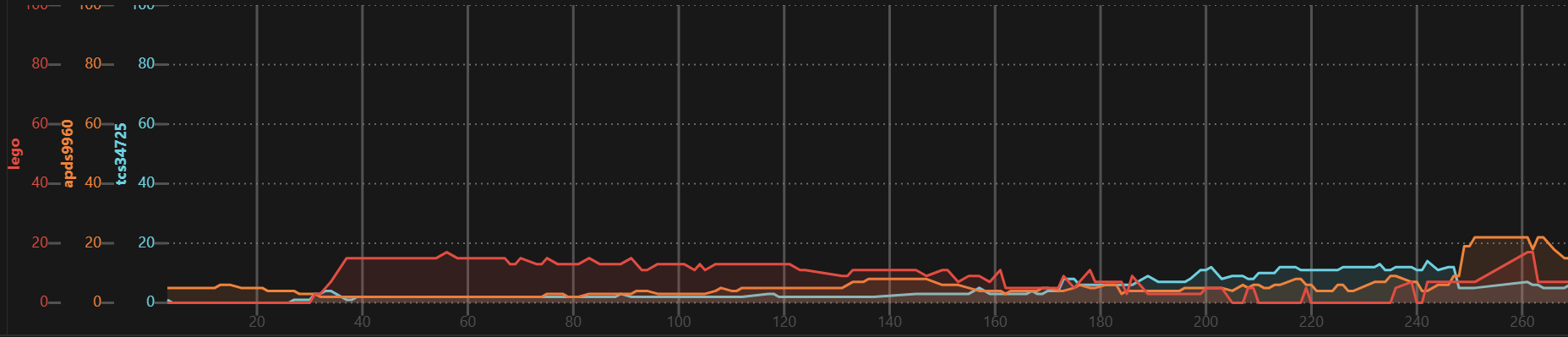
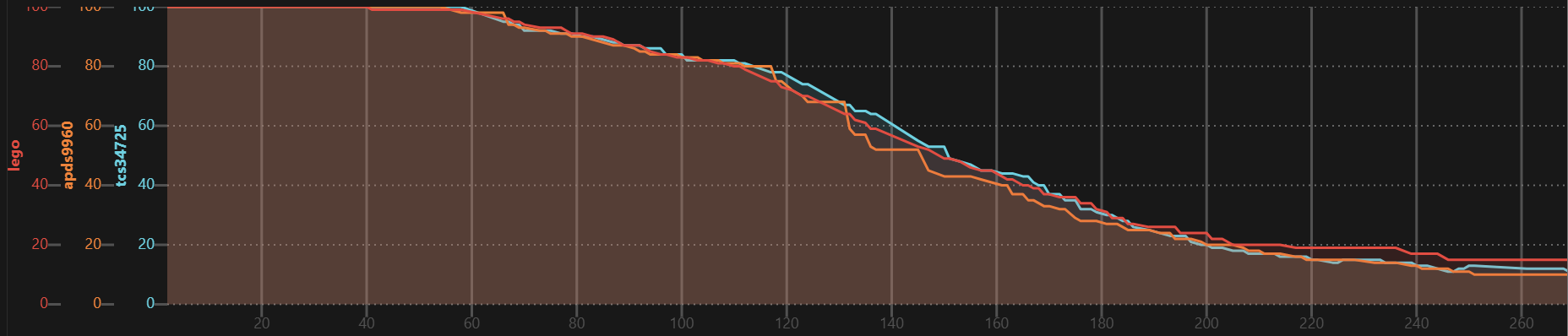
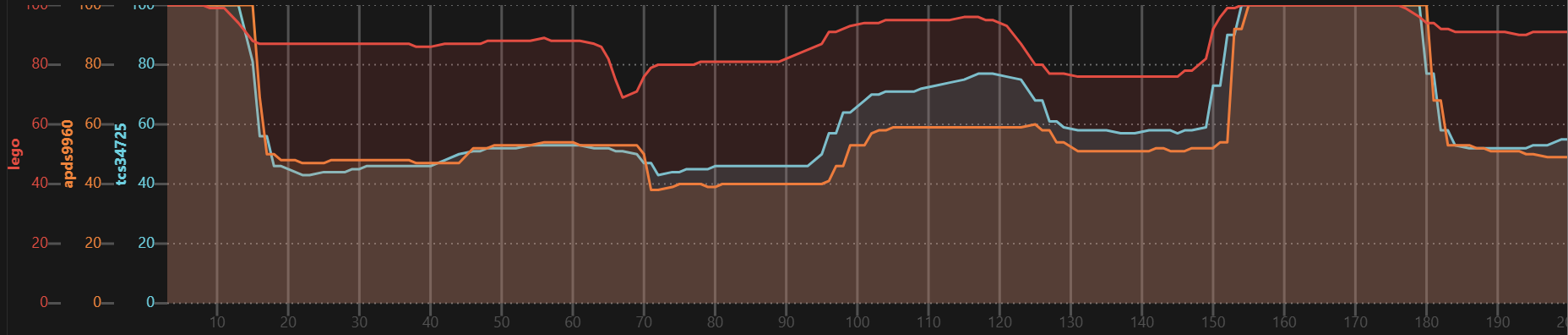
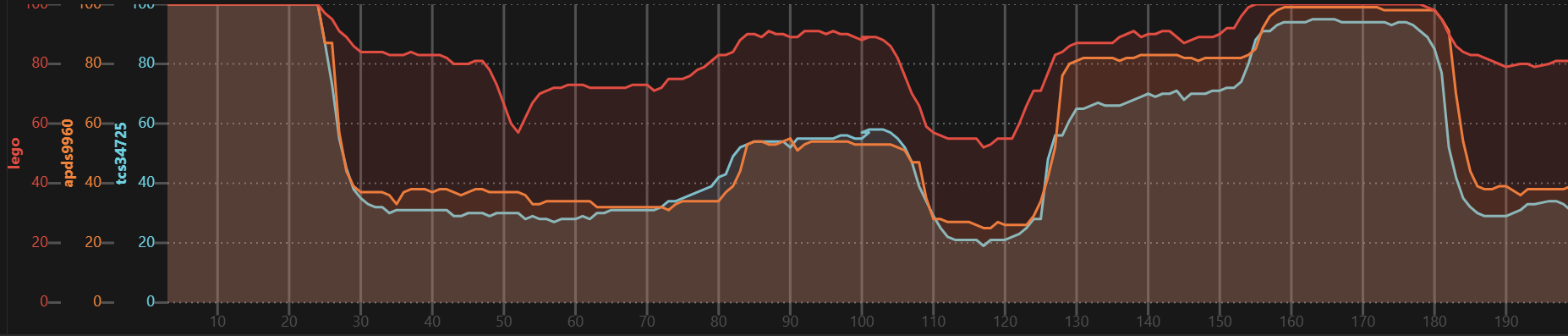
Test cases:
- Printed grey gradient: white to black
- Printed color bars: white, 0°=360° (red), 300°, 240° (blue), 180°, 120° (green), 60° (yellow), 0°=360° (red):
- Lego brick color: white, red, blue, light-blue, green, light-green, yellow, red:
H'ue
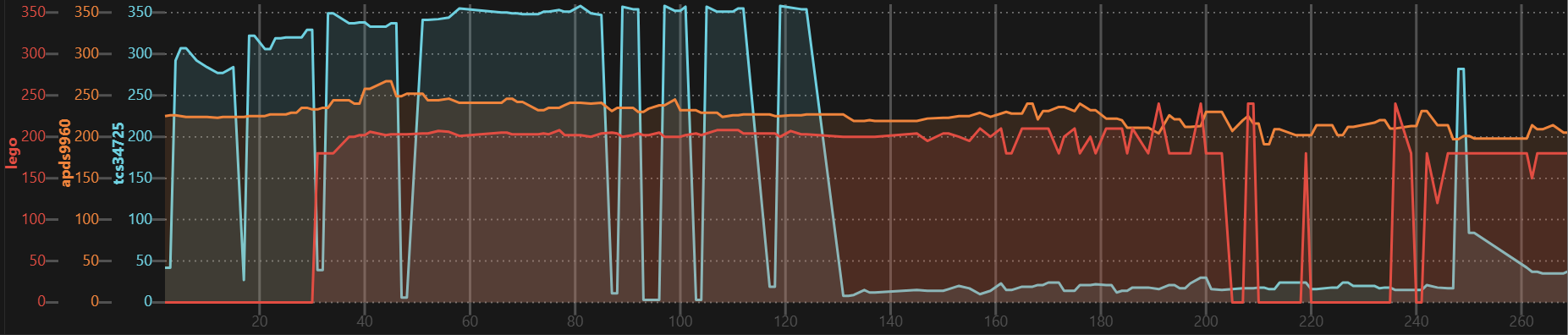
S'aturation
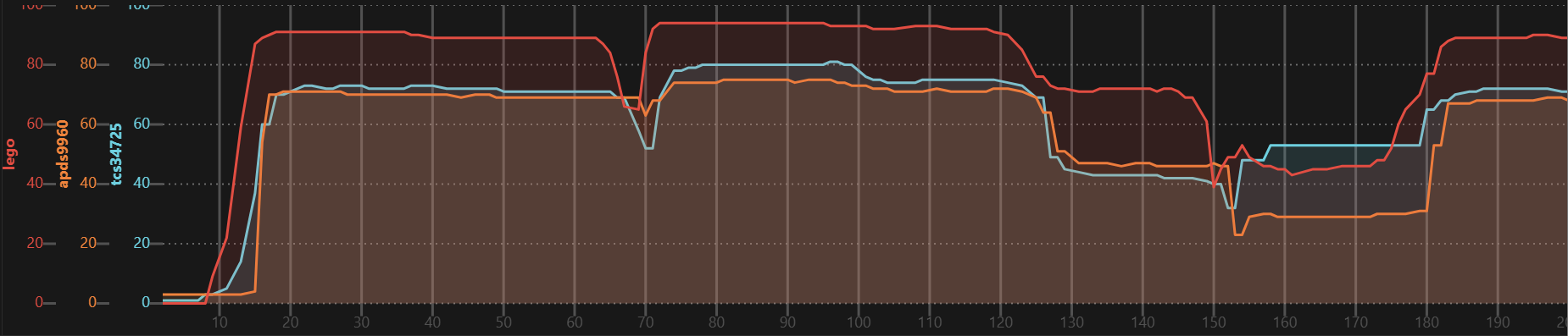
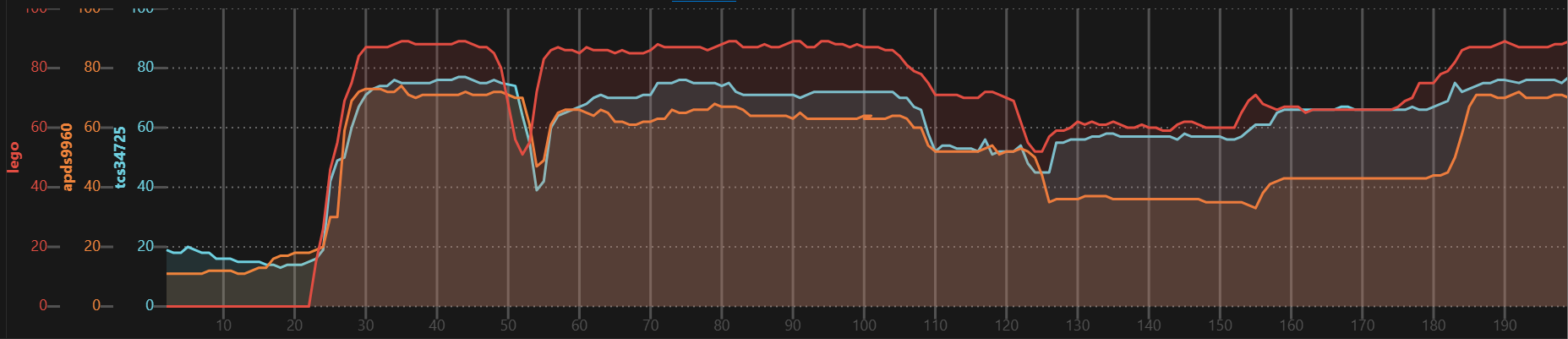
V'alue
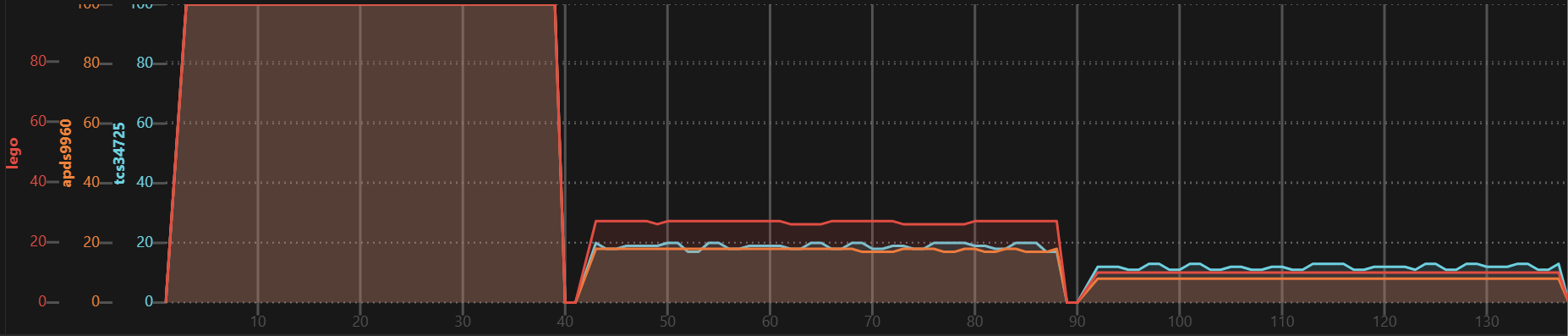
White paper at different distance from ground: 1 beam, +16mm, +32mm
Color processing
Preprocessing to HSV color space is best done on the LMS-ESP32 as it is twice as fast as the Lego Spike and only 4 instead of 8 bytes have to be transferred.
White balance: Highly depends on the onboard LED. Adjust before all else.
C'larity to V'alue: Highly depends on the onboard LED. I observed value in range 0..1500 and range 0..2100, which has to be converted to 0..100. Probably the Lego sensor does the same internally. With a function using two different slopes with transition at 80% I could get very close.
Has to be adapted per sensor, surface material and target colors, e.g.:
def tcs34725_rgbc_to_hsv(r, g, b, c):
    r, g, b = r*1.52, g,  b*1.27 # white balance
    h, s, _ = rgb_to_hsv(r, g, b)
    c80, c100 = 500, 1000 # 80% at 500, 100% at 1000
    if   c < c80:  v = c * 80/c80
    elif c < c100: v = (c-c80)/(c100-c80)*20 + 80
    else:          v = 100
    return int(h*360), int(s*100), int(v)
Copy rgb_to_hsv function from https://github.com/python/cpython/blob/main/Lib/colorsys.py.
On the Lego Spike the HSV values can be converted to the nearest color:
def hsv_to_color(h, s, v):
    if s < 20:
        if   v > 60:        return Color.WHITE
        elif v > 30:        return Color.GRAY
        else:               return Color.BLACK
    else:
        if h > 300 or h < 30: return Color.RED
        elif h < 75:          return Color.YELLOW
        elif h < 190:         return Color.GREEN
        else:                 return Color.BLUE
Be careful when mixing devices from different sources!
I had significantly different C'larity and white balance due to different onboardLEDs. After replacing with identical LEDs was better but not perfect.
TCS34725
I tested a 3x3 stud sized module and a 4x1.5 sized module. Both come with onboard LED.
I used the adafruit/Adafruit_CircuitPython_TCS34725 library with adafruit_bus_device/i2c_device.py from AHSPC/adafruit_i2c_device_micropython
import ...
from adafruit_tcs34725 import TCS34725

cs = TCS34725(SoftI2C(scl=Pin(4), sda=Pin(5), freq=100000))
cs.gain = 4
cs.integration_time = 4.8 # total time is 2.4 msec longer
cs.active = True

def tcs34725_rgbc_to_hsv(r, g, b, c):
    r, g, b = r*1.52, g,  b*1.27 # white balance
    h, s, _ = rgb_to_hsv(r, g, b)
    c80, c100 = 500, 1000 # 80% at 500, 100% at 1000
    if   c < c80:  v = c * 80/c80
    elif c < c100: v = (c-c80)/(c100-c80)*20 + 80
    else:          v = 100
    return int(h*360), int(s*100), int(v)


rs = PUPRemoteSensor(power=True)
rs.add_channel('cs','HBB')

while True:
    rs.process()
    if cs.interrupt:
        cs.interrupt = False
        r, g, b, c = cs.color_raw
        h, s, v = tcs34725_rgbc_to_hsv(r, g, b, c)
        rs.update_channel('cs', h, s, v)
APDS9960
[!NOTE] The device is EOL since end of 2024 and not produced any more. There are many fake devices!
One module was a fake device, only partially functional. A different one was ok.
The modules have no onboard LED, so I had to solder a tiny extension board with an SMD LED.
I used the liske/python-apds9960 library and contributed some enhancements.
import ...
from apds9960 import uAPDS9960

cs = uAPDS9960(SoftI2C(scl=Pin(4), sda=Pin(5), freq=100000))
cs.enableLightSensor()
cs.setLightIntegrationTime(15) # x*2.78ms = 13.9ms
cs.setAmbientLightGain(apds9960.const.APDS9960_AGAIN_4X)

def apds9960_rgbc_to_hsv(r, g, b, c):
    r, g, b, = r, g*1.25,  b*1.40 # white balance
    h, s, _ = rgb_to_hsv(r, g, b)
    c80, c100 = 750, 1300 # 80% at 500, 100% at 1300
    if   c < c80:  v = c * 80/c80
    elif c < c100: v = (c-c80)/(c100-c80)*20 + 80
    else:          v = 100
    return int(h*360), int(s*100), int(v)

rs = PUPRemoteSensor(power=True)
rs.add_channel('cs','HBB')

while True:
    rs.process()
    if cs.isLightAvailable():
        r, g, b, c = cs.readLight()
        h, s, v = apds9960_rgbc_to_hsv(r, g, b, c)
        rs.update_channel('cs', h, s, v)
GY-33
The board has a lens mount, which looks like a good protection against ambient light, but it is not necessary.
[!NOTE] This devices contains a TCS34725 and an additional microprocessor. Due to the high lag and limited configurability, I can not recommended it.
I used the QuirkyCort/micropython-gy33 library and contributed some enhancements.
import ...
from gy33_uart import GY33_UART

cs = GY33_UART(UART(1, baudrate=115200, rx=Pin(20), tx=Pin(19)))
# initially connect with baudrate=9600 and execute gy33.set_baudrate(115200) once.
# this switches the baud rate _permanently_ to 115k2 on next power on
#gy33.set_baudrate(115200)
cs.set_output(raw=True, lcc=False, processed=False) # speed up by disabling other responses
time.sleep_ms(200)
cs.set_integration_time(24)
time.sleep_ms(200) # required if it was > 24 before
cs.uart.read() # discard measurements with old integration time
cs.set_led(10)
if not cs.update(wait=1000): # connection check
    raise RuntimeError('gy33 not responding')

def gy33_rgbc_to_hsv(r, g, b, c):
    # todo: reuse tcs34725 code, but max clarity  is lower, white balance is different, ...

rs = PUPRemoteSensor(power=True)
rs.add_channel('cs','HBB')

while True:
    rs.process()
    if gy33.update():
        r, g, b, c = gy33.get_raw()
        h, s, v = gy33_rgbc_to_hsv(r, g, b, c)
        rs.update_channel('cs', h, s, v)